What's new?
The Wait action now supports User Replied as a wait condition. In addition to waiting for a contact to reply, you can now keep the contact waiting until a team member responds to the conversation before continuing to the next step. Combined with the timeout option, you can now build powerful SLA workflows that automatically escalate if no user reply is sent within your target response time.
How it works
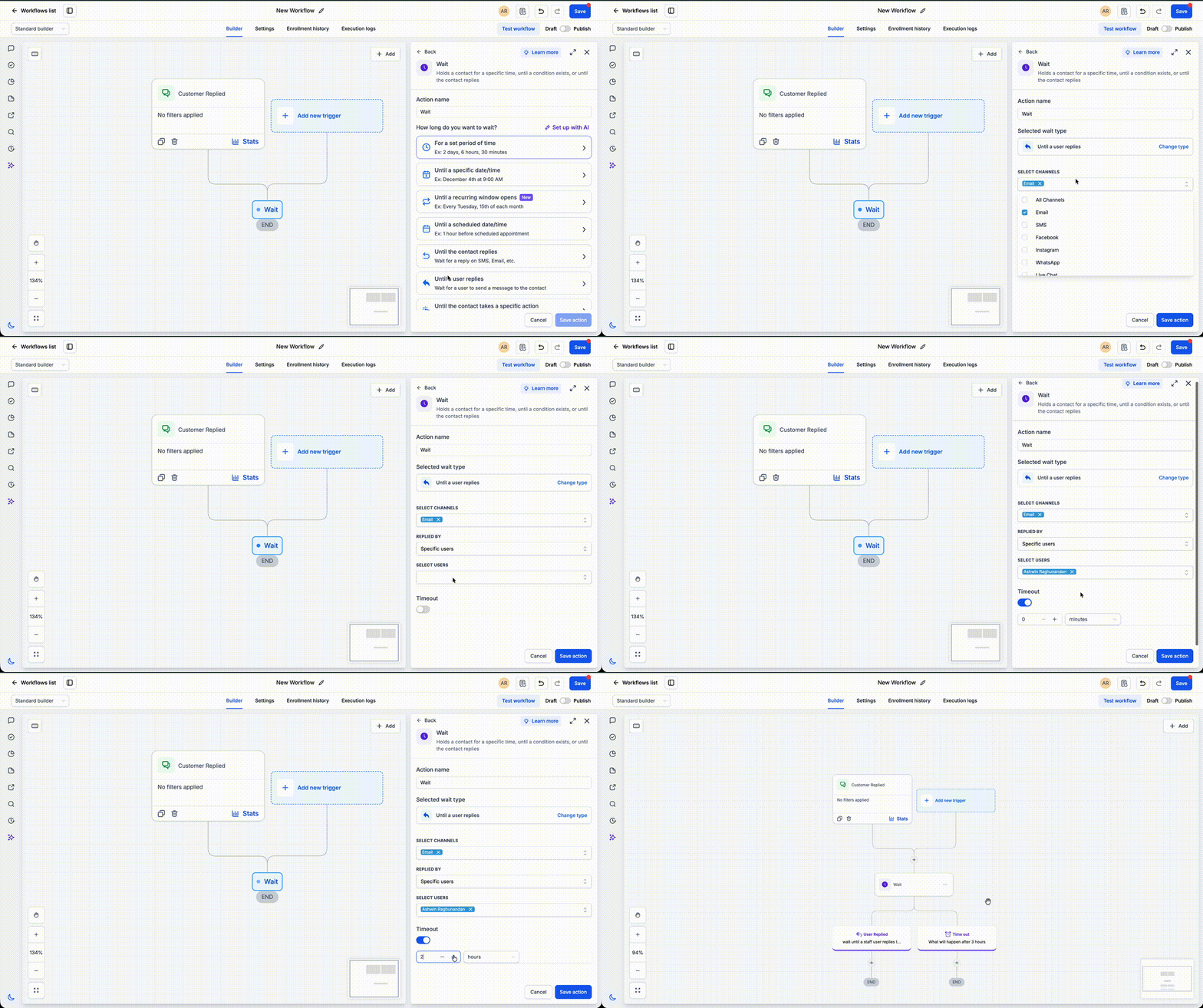
When configuring a Wait action, select User Replied as the wait condition and optionally define a timeout. The workflow pauses until a user replies or the timeout is reached - whichever happens first. If a reply is detected, the workflow continues immediately. If the timeout expires first, you can route the contact through escalation steps such as notifications, reassignments, or reminders.
How to use it
- Add a Wait action to your workflow.
- Select User Replied and configure an optional timeout.
- Define what should happen after a user replies or when the timeout is reached.
Why we built it
Response-time SLAs are critical for sales and support teams. This enhancement lets you automate first-response tracking, reduce manual monitoring, and ensure conversations are escalated when response targets are missed - all without building complex workflow logic.
Simple examples
- A support workflow waits up to 30 minutes for User Replied. If an agent responds within the SLA, the workflow continues normally. If the timeout is reached first, it alerts a supervisor and reassigns the conversation.
- A sales workflow waits 15 minutes for a representative to reply to a new lead. If no reply is sent before the timeout, the workflow creates an urgent task and notifies the sales manager to help prevent missed opportunities.
Additional Notes
- The contact resumes as soon as a user sends a reply or when the configured timeout is reached.
- If no timeout is configured, the workflow waits until a user reply is received.
- Ideal for first-response SLAs, escalation workflows, and internal response-time automations.
Preview
Was this article helpful?
That’s Great!
Thank you for your feedback
Sorry! We couldn't be helpful
Thank you for your feedback
Feedback sent
We appreciate your effort and will try to fix the article