We're introducing a set of enhancements to the Services payment experience that make checkout more flexible for customers while improving the accuracy of deposit calculations.
What's New
1. Choose Between Deposit or Full Payment
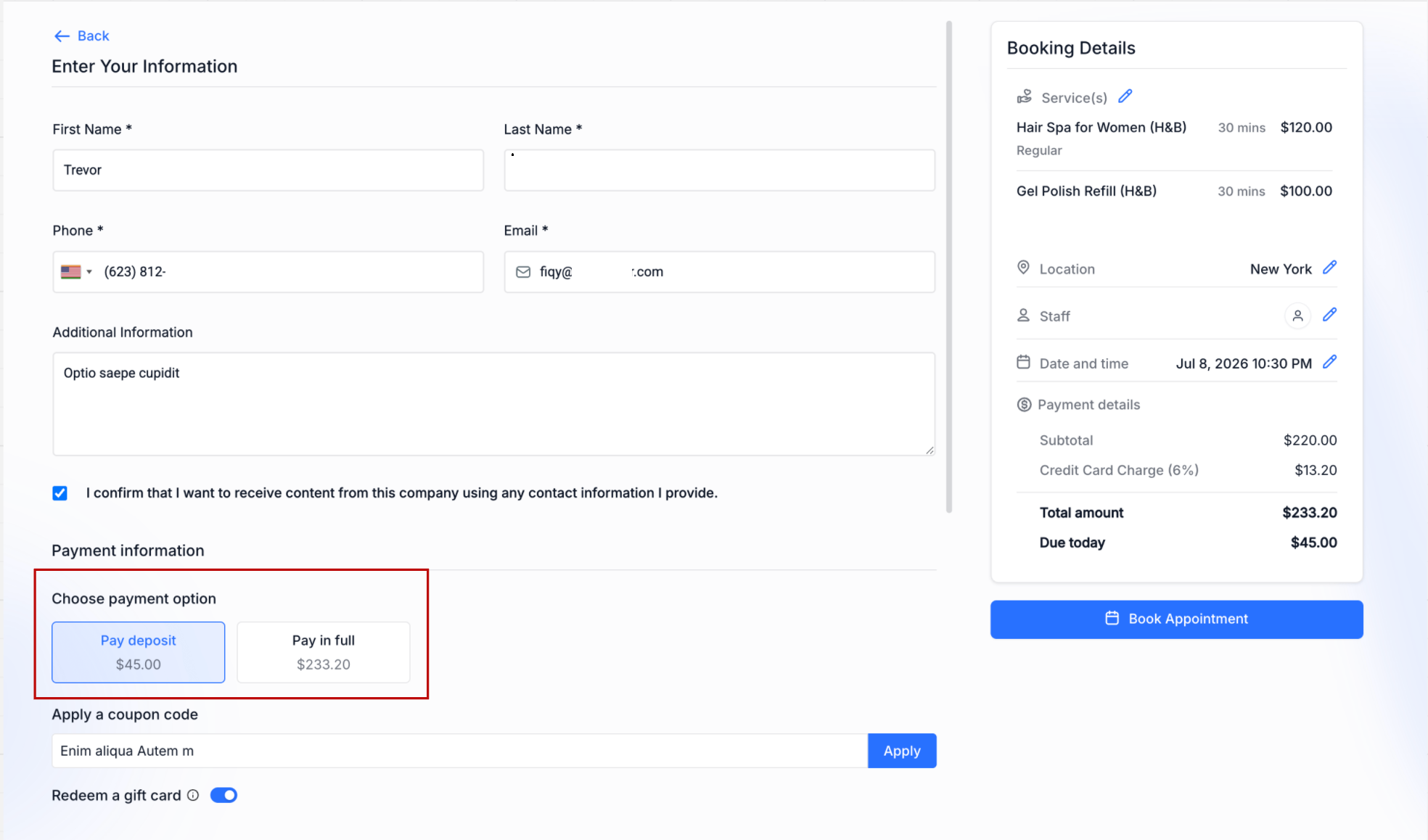
Businesses can now enable a new setting that allows customers to choose how they'd like to pay during checkout.
If enabled, for services with a deposit configured, customers will see two payment options: Pay Deposit and Pay Full Amount.
This option is available only when Online Payments are enabled and the service has a deposit configured.
If this setting is disabled, customers will continue following the existing deposit-only checkout experience.
2. Improved Support for BNPL
Customers who prefer financing their purchase can now choose to pay the full service amount, allowing supported Buy Now, Pay Later (BNPL) providers to finance the complete booking instead of just the deposit.
This creates a smoother checkout experience and gives customers greater flexibility in how they pay.
3. Smarter Deposit Calculations
Percentage-based deposits are now calculated using the final payable amount after discounts are applied, ensuring customers are only charged a deposit on what they actually owe.
If a coupon is added, removed, or changed during checkout, the deposit amount is automatically recalculated in real time.
Deposit calculations now also include applicable add-ons and taxes, based on the configured deposit percentage, providing a more accurate amount due at the time of booking.
Flat deposit amounts remain unchanged and continue to work exactly as before.
How to Use
Navigate to Services → Global Settings → Payment Settings.
Set the payment mode to Online Payment.
Enable Allow Deposit or Full Payment Choice.
Save your changes.
Once enabled, customers booking services with deposits will be able to choose whether to pay the deposit or the full amount during checkout.
Why This Matters
Give customers greater flexibility by letting them choose how they'd like to pay.
Better support businesses offering Buy Now, Pay Later (BNPL) payment methods.
Improve transparency by ensuring deposits accurately reflect the final booking value.
Was this article helpful?
That’s Great!
Thank you for your feedback
Sorry! We couldn't be helpful
Thank you for your feedback
Feedback sent
We appreciate your effort and will try to fix the article